
How to easily make eye-popping scientific posters using AI

Updated: Jan 19

For those of you familiar with our blog, you’ll know that we are on a crusade to fix scientific posters. We are tired of seeing the same mistakes hold back researchers from having a real impact and enjoying great conference experiences. Poster sessions can be fantastic networking opportunities, but not if you rock up with a wall-of-text poster that nobody wants to look at. If you want your poster to stand out, it needs to be visually striking. Most importantly, it needs to contain an eye-catcher! The problem is that researchers are typically not designers...(can you blame them?) So, creating a visually appealing eye-catcher is often a massive hurdle. Luckily, things have changed a lot thanks to the emergence of image generation through AI. These days you don’t need a single creative hair on your body to create a fantastic, eye-catching visual for your poster. With the right prompt, AI can make your poster worth 2 000 words! Let us show you how.
We have a great course on good poster design that goes into detail about all of the important elements and steps that go into designing a successful scientific poster. To help set the stage for our discussion about using AI to generate cracking visuals, here are a few of the top tips from our course for free (lucky you!):
First and most obviously, no wall of text!
Include some negative space to rest the eyes.
Don’t overuse graphs or charts (use 2 at most).
Aim for a maximum of 250 words in total (yes, really).
The main visual element needs to stand out even when seen from across the room.
All of these tips are aimed at making the poster more visually accessible, but let us pause at the last point, since that is where AI can really make a difference. Why does a poster need to stand out from afar? Compare the images below:


There’s just no comparison, right? No one is going to notice a wall of text, and if they do, they are not going to be inspired to go up and read it. On the other hand, a poster that has a striking image and is logically broken up into discrete visual elements instantly jumps out at the audience - and has a much higher chance of being read (not to mention, understood).
Why?
Because our monkey brain can process images in as little as 13 milliseconds - way faster than it can process text. Test it yourself with the example below:
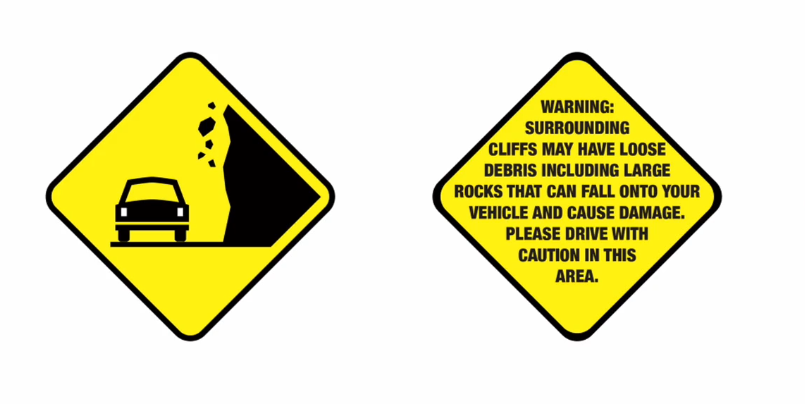
Most likely, you knew the meaning of the road sign on the left the moment you saw it. In contrast, it takes much longer for your brain to interpret the meaning of the sentence on the right (even though it has the exact same basic message). Simply put, a sentence is never going to grab attention like an image can.
AI wizardry for scientific posters
With the proliferation of AI tools currently at your disposal, there are now so many options to consider for creating eye-popping visuals for your posters in truly creative ways. Just have a look at this lovely example from a student who recently completed one of our courses:

Without having read a single word, the viewer can instantly see that the poster has to do with the genetic makeup of different grape varietals, thanks to the merged image of grape bunches with a DNA helix right in the middle. It is simple, elegant, beautiful and perfectly conveys the subject matter at first glance. Getting AI to create the perfect visual for your poster will likely not be as simple as writing a single prompt. It will usually take a few iterations and some patience. But once you get it right, it will totally be worth it. Before we get into the nitty-gritty of how to do this, it is important to note that you can use AI for poster images in a variety of ways. For instance:
You can use AI to help you brainstorm unique, innovative ideas for eye-catching visuals for your specific poster content.
💡 Prompt suggestion: You are an expert graphic designer specialising in scientific posters. Read the attached paper and help me to brainstorm ideas for a unique central visual element for my scientific poster that is related to the research, and will be striking even when seen from across the room. Start with 10 ideas.
You can upload example images for the AI to work from, if you have a specific idea in mind. Even better, you can make a simple sketch of what you're after on a piece of paper, take a picture of it and provide it to the AI as a reference. You can also ask most AI image generators to combine uploaded images (like the bunches of grapes and the DNA helix in the example above).
AI can create similar images in a vast variety of styles for you to be able to compare which style works best for your poster (digital art, photorealism, minimalist art, vector graphic art, blueprint/architectural sketches, abstract art, cyberpunk or sci-fi, fantasy art, renaissance art etc.).
AI can help you to condense your paper into logical, discrete sections of text to arrange around your visual elements.
💡 Prompt suggestion: You are an expert science communicator specialising in designing scientific posters. Read the attached research paper and summarise the contents in a set of logical, easy-to-follow information blocks that most effectively conveys the narrative arc of the research, from question to results and conclusions. The text for the poster should not exceed 250 words. Include 5 suggestions for a catchy title.
Now for the nitty-gritty. Let’s see what the basic steps are that you will need to follow to make the best use of AI images for your poster.
1. Define the concept before you touch a prompt
If you don’t have a specific visual concept in mind, that’s fine, you can use AI to help you brainstorm ideas as discussed above. If you do have a specific concept in mind, though, jot down a single sentence that captures the idea your visual needs to convey. Having a clear concept keeps later prompts focused and prevents generating lots of pretty-but-pointless art. This is because AI image generation is powerful and can often provide many different iterations. It is easy to get lost or sidetracked by what looks good versus what you set out to achieve. So, keep your focus on what best conveys the research.
💡 Example: My paper presents the novel Flaming Torch Media Ethics Theory, which holds that: “Like a flaming torch in the hand, any new technology or scientific discovery can either light the way in the darkness, or burn the whole forest down (often both)”. As such, I want to use an image of a robot hand holding up a primitive flaming torch (new vs old technology) at the centre of the poster.
2. Pick the generator that matches your goal
By now there are a gazillion image generators out there, many of whom are excellent, but not all of whom will be best suited to what you have in mind. Here are the ones we recommend (and their best use cases):
The image generation capabilities within ChatGPT itself, as well as within Google’s Gemini, have grown leaps and bounds and keep getting better with every passing month. These two will likely be the easiest places to start for generating eye-catching visuals for your poster, and also let you create images even on the free plan, although with some limitations.
Midjourney is a fan-favourite paid option that excels at abstract, stylised or cinematic looks. Also, its native 2048 pixel (2K) output is useful if you plan to print big (more on this later).
Leonardo AI is a very capable, more user-friendly option than Midjourney and gives you some free image credits every day. Plus, it’s an Australian company for a change!
The Adobe Creative Suite is expensive, but if you can afford it (or your university pays for it) advanced AI capabilities like Firefly or Adobe Photoshop’s Generative Fill tool, to extend backgrounds or to seamlessly add missing objects, or the one-click Remove Background function, can be extremely handy to fine-tune your images once they have been exported (see below).
Canva has been the go-to entry-level design staple for a long time, and has a ton of useful templates and design tools for your poster, even before adding AI functionality. Canva’s native AI image generator or its more advanced Magic Design feature are, therefore, great when you’re already laying out the poster in Canva. It is also biased toward accepted, clean design principles. Be aware though, that Canva is mostly used for marketing (creative content), and not for scientific posters. So, most of the poster templates have nothing to do with research posters and are more like advertising posters. Just something to keep in mind.
3. Write a detailed prompt that bakes in style, colour and mood
The key is to be as specific as you can be in your image prompting. Give the AI as much context as possible, and as much direction as you can. For instance, you need to specify the aspect ratio you want, otherwise it will default to landscape (4:3). It is particularly important to specify a unique style because if you don't, the model will also default to the stereotypical AI look and feel that we are all now bombarded with and getting tired of. So make sure to include specific keywords like “flat icon style,” “dark-teal colour palette,” or “vibrant brushed-ink texture” etc. You can even go as far as giving AI the HEX codes of the exact colours you want it to use! Research shows that richer text prompts often yield more original and useful results.
💡 Example prompt: I need an eye-catching central visual element to use in the design for a scientific poster. My paper is about the Flaming Torch Media Ethics Theory, which holds that, like a flaming torch in the hand, any new technology or scientific discovery can either light the way in the darkness, or burn the whole forest down (often both). As such, I need an image of a robot hand holding up a primitive flaming torch (new vs old technology) to use at the centre of the poster. I only require the image; do not add any text or labels. Use a colour palette of bright orange and red for the flame, brown and black for the torch branch, and deep and light blues for the robot hand. The background can be green. Make the image simplistic in design and high in contrast to stand out as much as possible. Make the image 16:9 format, in portrait orientation.
4. Iterate!
Many image generators will provide you with multiple variations of the same generated image to choose from (usually between 2 and 4), which is useful to compare what works and what doesn’t. With ChatGPT, you will need to ask every time you want it to give your image prompt another go. With Leonardo AI’s Flow State feature, you can simply scroll down and it will keep generating new variants until you see one you can work with.
The important thing is to realise you will have to iterate.
The very first generated image will almost never be perfect, but thanks to the nature of Large Language Models, you can just tell it what doesn’t work, and it will adjust the image and try again.
For instance, you can ask it to “make the image look more realistic” or “add more negative space at the top for a heading” or “try a version with darker colours” and so on. Don’t settle for the first passable version. If you keep going, you will eventually strike gold.
Once you have a good selection, save at least three favourites; you might change your mind tomorrow about which one you like best, or you can ask the AI to mix and match to come up with a new variant. Remember, you are no longer limited by the amount of paper or art supplies or hard disk space you have.
The only real limit is your imagination.
💡Example iterations:


5. Upscale your image to poster-ready resolution - and export!
AI-generated images are often not high enough in resolution to be print-ready for physical posters to use at a conference. Luckily, there are AI tools for that as well:
Upscayl is free and works well; you’ll typically need a 4-6× boost to hit the typically required 300 dpi (dots per inch) resolution for standard poster sizes. Topaz Labs has a deeper dive on upscaling methods and the resulting quality differences.
Always export at 300 dpi PNG (or high-quality JPEG) before placing the image in your poster layout. Double-check pixel dimensions of the image: for an A0 (841 × 1189 mm) poster, you’ll want roughly 10 000 × 14 000 pixels if the graphic spans the full width; scale down proportionally for smaller placements.
Topaz Gigapixel 8 can push images up to 16 times their original size, which is ideal for A0 prints. But it comes with a hefty (99$) price tag.
Caveats
It is important to remember that there are still some limitations when it comes to AI imagery. Firstly, you will need to mention, somewhere on the poster, that the image was AI-generated, since this is becoming best practice when it comes to using AI in research. Credit to the specific AI company is not necessary, however, since the legal system says that AI generations are public domain.
Secondly, AI images are everywhere these days and getting easier to spot in public simply because people are so bombarded with them. So be careful not to include an AI image just to ride the trend. Your image will only stand out if it can stand on its own as a polished artwork that you spent some time achieving (even if vicariously through iterative prompting).
Finally, bear in mind AI works excellently for conceptual images but tends to fall apart when you need accurate detail (like for scientific illustrations with labelling). So in short, use AI to ‘prettify’ your poster - but not for anything related to research evidence.
That’s it! You now have all the necessary knowledge to get started on prompting some proper eye-popping poster visuals. For more in-depth learning on all things AI, check out our comprehensive course on AI for researchers.
Happy visual storytelling!


